
Setting up your device
For Android version before Oreo (8.0)
From your smartphone or tablet running Android 4.0 or higher, go to Settings, scroll down to Security, and select Unknown sources. Selecting this option will allow you to install apps outside of the Google Play store. Depending on your device, you can also choose to be warned before installing harmful apps. This can be enabled by selecting the Verify apps option in the Security settings.
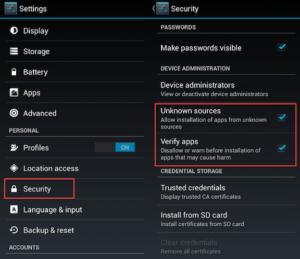
On devices running an earlier version of Android, go to Settings, open the Applications option, select Unknown sources, and click OK on the popup alert.
For Latest Oreo, refer to following instructions.

From your smartphone or tablet running Android Oreo (8.0.0) or higher, go to Settings and search for “Install unknown apps”. Once you are in that setting, select Google “Drive” option and then enable “Allow from this source”.
Download the app
Now download the QuadMyHome.apk click the icon 
Installing the app
Once the QuadMyHome.apk is downloaded, automatically it would request you to install the Application. Please select Install option and proceed.
In case Installation does not start automatically, then go to “Downloads” application of Android and manually select QuadMyHome.apk and launch it.